
Settings part overview
In the Settings part you will find
- Settings
The Settings tab contains all the information needed to work effectively in Droppery. This information is used by the Droppery team and suppliers to review connection requests.
The information in the “Basic Information” section must be kept up to date at all times, as unsaved changes may result in interrupted data transfers.
Each modification must be confirmed with “Submit” at the bottom right of the window.
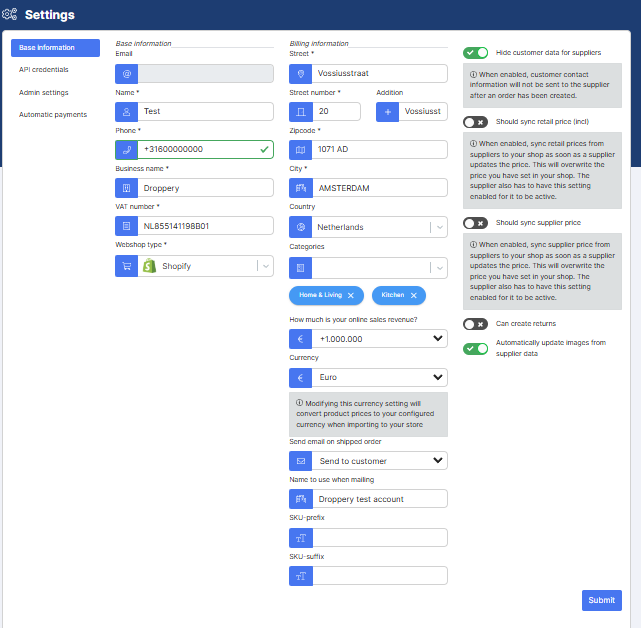
There are four settings on the right side that a user can choose to enable or disable:
- Hide customer data for suppliers
This setting will hide the end user's contact information when creating an order, thus only transmitting shipping details
- Should sync retail price (VAT included)
If this setting is enabled, Droppery will automatically update the retail price in your store, if we receive a price change from the supplier. If disabled, price will not be affected by changes after initial product import
- Should sync supplier price
If this setting is enabled, Droppery will automatically update the (usually hidden from customers) supplier price, if we receive a price change from the supplier. If disabled, price will not be affected after initial product import
We recommend enabling this setting, to avoid any payment issues in the future.
- Automatic updating of images.
If you want to use images from the provider only, you can select “Automatically update images from supplier data”
Conversely, if you want to use your own images for your products, you can unselect this setting so that new images provided by the supplier will not overwrite your current images.
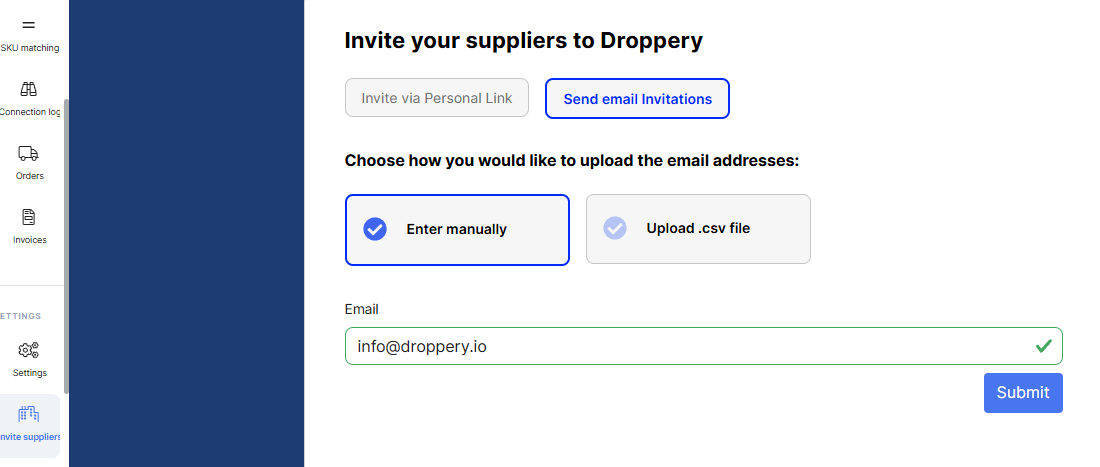
- Invite suppliers
You can use this part to invite your current suppliers to Droppery. This part gives them an introduction to Droppery. If we are able to sign them thanks to your invitation, you get a free connection with them.
- API token
This tab can be ignored.